
Inventory · Remise
The inventory of all your equipment
Scaffolding, fencing, formwork, tools: all your company's equipment, in one place. Your team records outs and returns by writing to Claude, and Inventory updates the stock.
For equipment rental companies, equipment managers and contractors who run their own fleet.
- Available
- Included in the TektonAI subscription
How it works. You write it, Inventory records it.

Claude passes every out, return or count to Inventory, which updates the stock and the log. Scaffold uses the same inventory for your plans.
- 01
“How many 5 ft frames are available in the yard?”
- 02
“Send 40 frames and 40 planks to the site at 245 Example Street.”
- 03
“The 245 site returned 12 planks, 2 of them for repair.”
- 04
“Who took out screw jacks this week?”
- 05
“What did Julie change in the inventory since Monday?”
- 06
“Open a rental contract for Example Construction, 245 site: 40 frames and 40 planks, due back November 30.”
- 07
“Which rental contracts are late?”
- 08
“Print the labels for our 5 ft frames.”
- 09
“I want to import my inventory.”
A real example. Produced by Inventory.
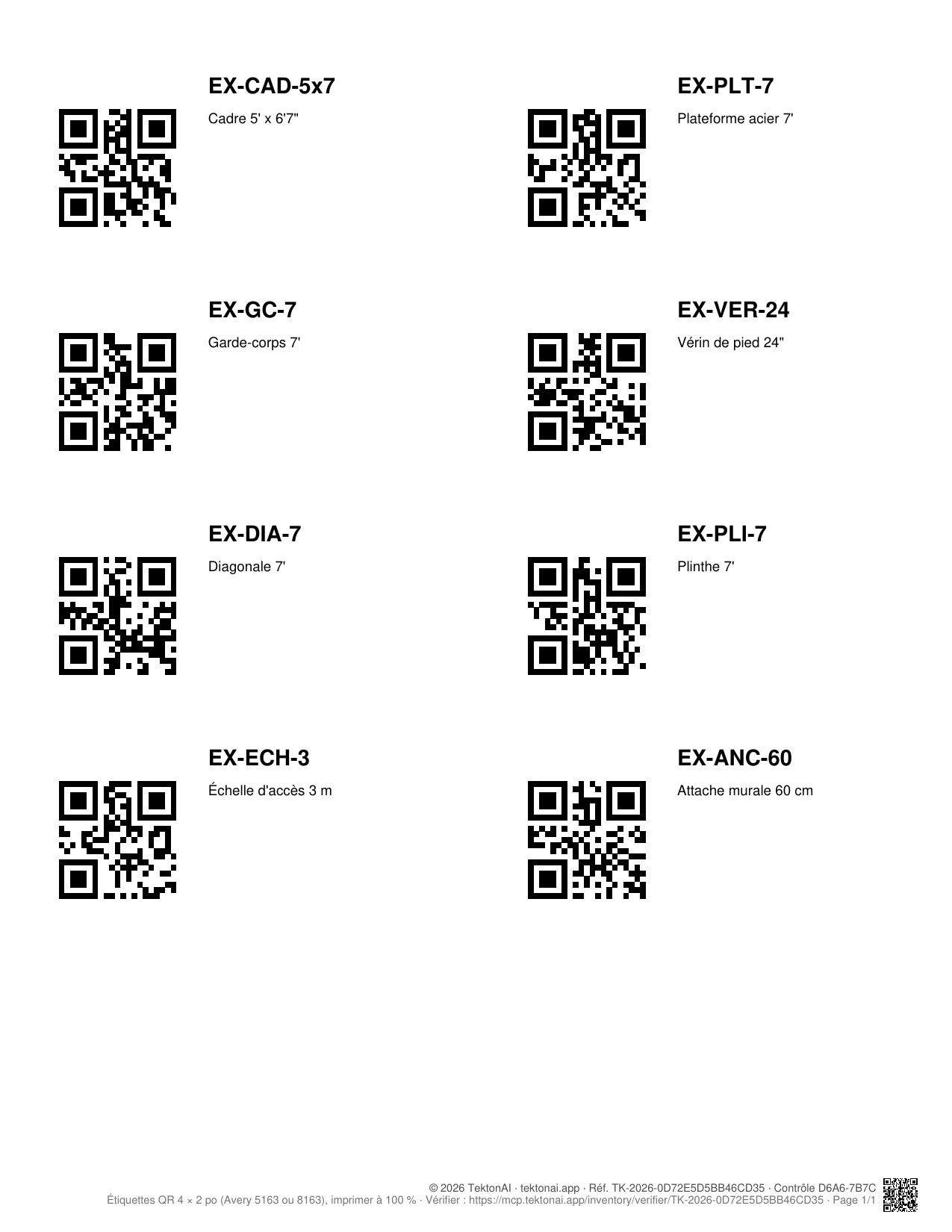
A QR label sheet and an extract of the movement log, as Inventory produces them, with fictitious data. This example is in French; labels and slips are also printed in English.
| Part | Movement | Qty | From → to | Reference |
|---|---|---|---|---|
| EX-CAD-5x7 | Import | +40 | Available | |
| EX-PLT-7 | Import | +60 | Available | |
| EX-CAD-5x7 | Rental | +16 | Available → Rented out | Main Street site |
| EX-PLT-7 | Rental | +24 | Available → Rented out | Main Street site |
| EX-CAD-5x7 | Return | +4 | Rented out → Available | Main Street site |
| EX-PLT-7 | Sent for repair | +2 | Available → For repair | Plank dented on return |
| EX-PLT-7 | Repaired | +2 | For repair → Available | Straightened in the shop |
Each line also keeps the date and the employee's name.
Example of Inventory labels, 4 × 2 in (Avery 5163).
What it does.
Inventory · Remise
AvailableThe inventory of all the company's equipment.
- Stock by status and location. For each part, see how many are available, rented out, in for repair or out of service, and where they are: in the yard, on a site or in a truck.
- Every stock movement recorded. Record an out, a return, a rental, a repair, a transfer between locations or a count. Each movement keeps the date and the name of the employee who recorded it.
- Your existing list, imported.
- Import an Excel or CSV file, up to 50,000 lines (5 MB).
- Give Claude a manufacturer PDF, a photo or a list: it reads the parts from it.
- Check the import preview before you confirm it, then follow its progress.
- If a column is not recognized, a form asks you what it contains.
- If the records are missing information, such as weight, a form asks you for it.
- What your file contains is kept as is, including a part's English name.
- A log nobody can edit.
- Every change to the inventory is recorded automatically, with the employee's name and the time.
- Nobody can edit or delete this log.
- The administrator sees who did what, what is still pending and which employees changed nothing during the period.
- Rental contracts.
- Open a rental contract from the conversation: client, site, dates and parts. The stock moves to on-rent as soon as it opens.
- Record returns in several loads. Damaged parts go to repair.
- A return larger than the quantity that went out is refused.
- See what each client or site still has, and which contracts are late.
- Print rental and return slips to sign. Each slip can be verified online.
- Your parts in the plans. Scaffold uses your inventory: your plans' bill of materials uses your part numbers and weights. Upcoming tools will use the same inventory.
- Barcodes and labels.
- Scan a part to find it or record a stock movement.
- Scan with a barcode reader (USB or Bluetooth), a phone app or the phone's camera (reading page provided by your assistant).
- Enter the code manually if needed.
- Link the manufacturer's codes (UPC, EAN) to your parts, also at import through a barcode column.
- Count a location by photo: the counting page, valid for one hour, reads the labels and shows the differences with the recorded stock.
- Print your Code 128 or QR labels, 10 per Letter sheet (Avery 5163 or 8163).
- Nothing without your confirmation. Nothing enters the inventory without your confirmation. An import never deletes a part or a movement.
- Private to your company. Other companies see neither your parts nor your movements.
https://mcp.tektonai.app/mcp to Claude. The Getting started tutorial shows how to import your list.Questions.About Inventory.
How do I import my parts list?
- Ask Claude to import your inventory.
- For an Excel or CSV file (up to 50,000 lines, 5 MB), Claude gives you an upload link valid for one hour.
- After you confirm, you see the import's progress.
- For a manufacturer PDF, a photo or a list, give it to Claude in the conversation: it reads the parts from it.
What happens to parts already in the inventory?
Before each import, you choose:
- Add only new parts.
- Add the quantities (a delivery).
- Update the stock of the parts in the file (a count).
- Replace the whole inventory (a full count): parts missing from the file go back to 0.
- The preview shows the effect of each choice before you decide.
Can Claude import without my approval?
- No. Claude prepares the import and shows you its summary.
- You confirm it with the “Importer / Annuler” card if your app shows it, otherwise by typing “Import” in the conversation.
- A vague answer like “yes” is refused.
- Nothing enters the inventory before you confirm.
- No import deletes a record or a movement from the log.
Can I use barcodes?
Yes:
- Scan with a barcode reader (USB or Bluetooth) or a phone app that types the code into the conversation.
- To scan with your phone's camera, ask your assistant for the reading page.
- You can also enter the code manually.
- Link the manufacturer's code (UPC, EAN) to the part, in the conversation or through a “Barcode” column in the imported file.
- Print Code 128 or QR labels, 10 per Letter sheet.
- Try your barcode reader before equipping the whole team.
Does Inventory track rentals?
Yes:
- A rental contract shows the client, the site, the dates and the parts.
- The stock moves to on-rent as soon as you open it.
- Returns can come back in several loads. Damaged parts go to repair.
- A return larger than the quantity that went out is refused.
- Inventory shows what each client or site still has and which contracts are late.
- It prints rental and return slips to sign, verifiable online.
- It does not calculate prices or invoices.
Who sees our inventory?
Only your company's members. Each movement carries the name of the employee who made it. The activity log, which records every change and cannot be edited or erased, is for the company's owner and administrators only.
Another question? info@tektonai.app