 TektonAI
From architectural drawings to a 3D and PDF scaffold plan
Attach architectural drawings to Claude: it reads the dimensions, you make the choices, Scaffold draws the scaffold. A real example, from start to finish.
Before you start: create a TektonAI projectThe instructions to paste into Claude or ChatGPT, once and for all.
A project keeps instructions that apply to all its conversations. Create one for TektonAI: in every conversation, your assistant knows what our tools do and how you work, without you repeating it.
In Claude (tested)
- In Claude's left sidebar, open Projects, then Create project. Name it, for example “TektonAI”.
- In the project, open the project instructions and paste the text below. Replace the parts in brackets.
- Open a conversation in this project. In the conversation's tools menu, check that TektonAI is turned on.
On a Claude Team or Enterprise plan, share the project with your colleagues: they all start from the same instructions.
In ChatGPT (not tested)
- In ChatGPT's left sidebar, create a new project.
- In the project settings, paste the text below into its instructions.
TektonAI must first be added to ChatGPT: see Connect your AI assistant.
In Claude Code
Paste the text into the CLAUDE.md file of the folder you work in.
The instructions to paste
You work for [your company name], a construction company in [city, province], with the TektonAI tools connected to this conversation.

What the TektonAI tools do:
- Scaffold prepares 3D scaffold plans from the dimensions of the structure: dimensioned A3 PDF plan, CAD plan (DXF), 3D model (STEP), bill of materials in Excel and CSV, and the load takedown. It revises an existing plan from its drawing number.
- Inventory keeps track of everything our company owns: quantities available, rented out, in for repair and out of service, by location, and every movement with the employee's name. It imports our parts list and reads barcodes.
- Scaffold plans use the parts of our Inventory when we ask.
- Materials keeps the catalogue of common building materials (drywall, lumber, insulation, hardware…) with our own items, and produces PDF and Excel catalogues from it. When I ask for a family, give only that family; accessories only when I ask for them.

How to work with me:
- Answer in English, in plain words and site terms. Produce documents (plans, calculation notes, labels, slips) in English.
- Use the TektonAI tools for every plan, quantity or weight. Never make up a dimension, a quantity or a weight.
- Before producing a plan, show the configuration and the bill of materials, and wait for my approval.
- When a tool asks me a question through a form, let me answer it myself. Never choose the duty class (light, intermediate or heavy) for me.
- Leave plans at the “PRÉLIMINAIRE” (preliminary) status until I give you the names of the person who checked the plan and the person who approved it.
- For an import into Inventory, show the preview, let me choose the mode and wait for my confirmation: a click on the card, or the word “Import” that I type myself. Pass my message on exactly as I wrote it.
- Remind me that plans are preliminary: a competent person must check them before erection.
The same text is also at tektonai.app/en/project-instructions.md.
You need to scaffold a building and you have its architectural drawings. You don’t have to copy the dimensions by hand: attach the drawings to Claude.
- Claude reads the lengths and heights.
- It tells you what is missing.
- Scaffold · Échafaud then draws the scaffold.
This tutorial follows a real building from start to finish: the Dimling-Bolan Building, in Pittsburgh. It is a three-storey masonry commercial building at the corner of Wood Street and Forbes Avenue. Its measured drawings were published by the Historic American Buildings Survey, a United States government program. They are distributed with no known restrictions. All the results shown below were produced by Scaffold from these drawings.
What you need
- The elevations of the façades to scaffold. They give the heights: floors, cornice, parapet.
- A floor plan. It gives the façade lengths and the projections.
- These drawings as PDF files or images. A sharp photo of a paper drawing also works, if the dimensions are readable.
- A TektonAI account added to Claude. See Get started with TektonAI.
- A TektonAI project, created as explained above.
Here are the two sheets of our example:
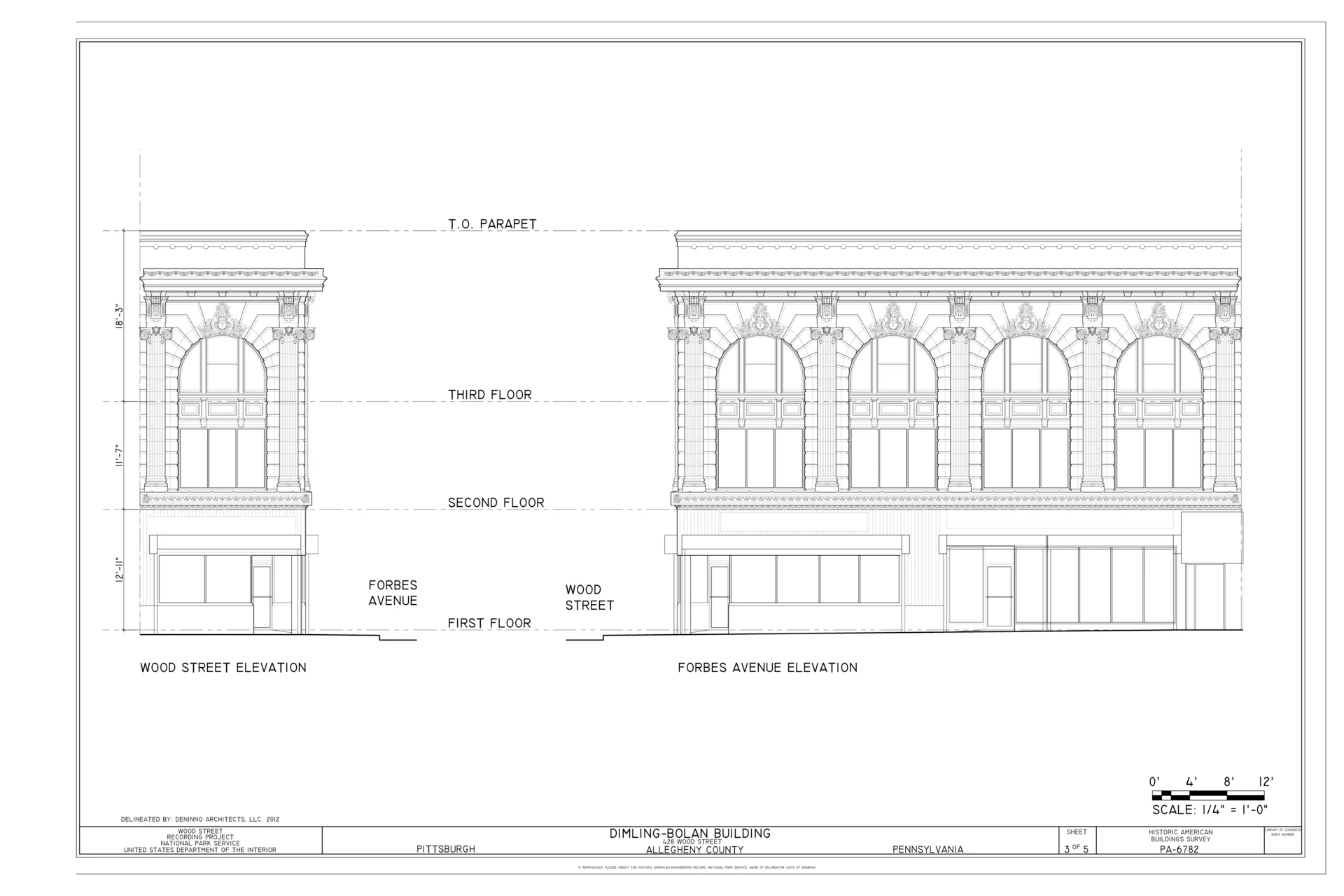
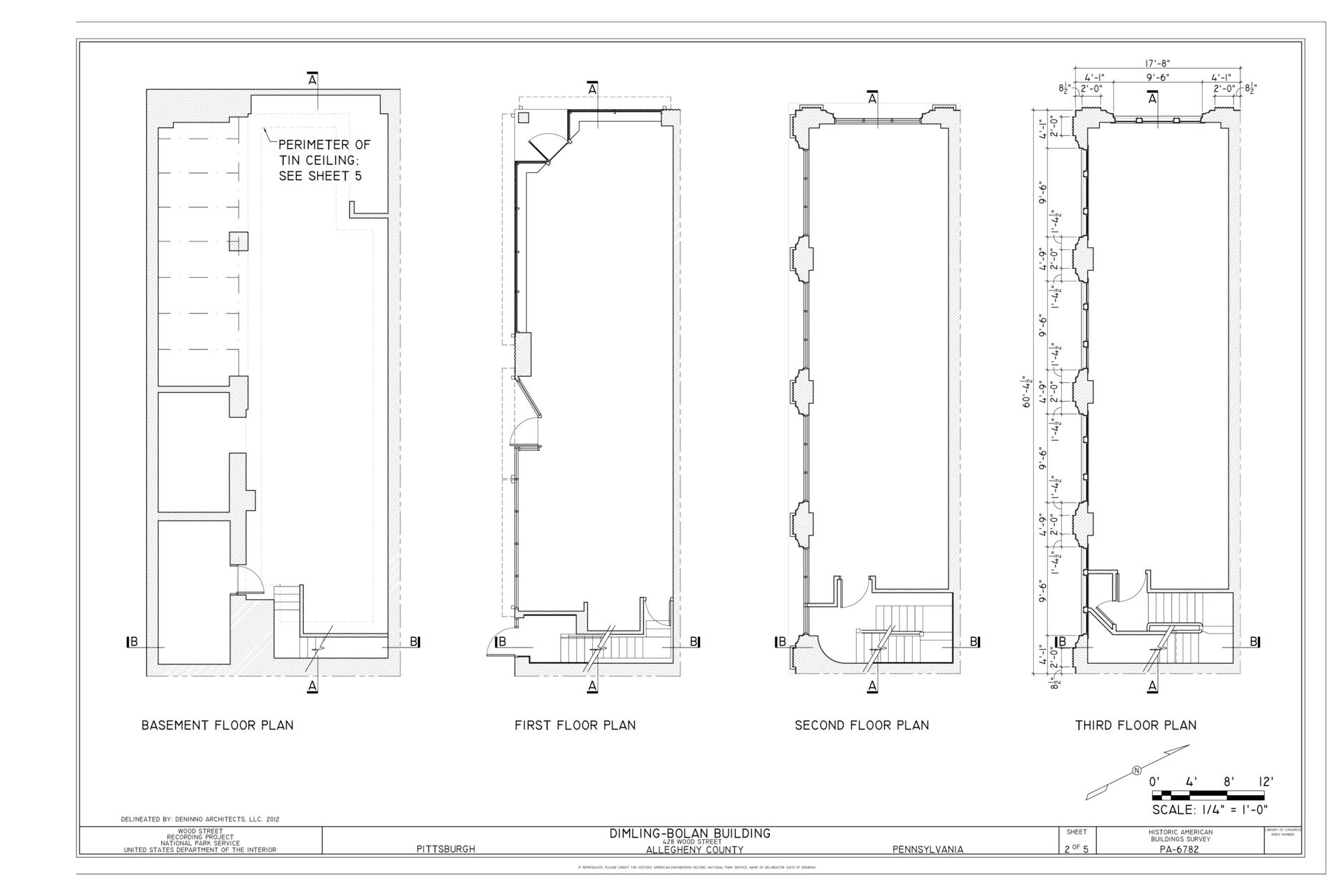
Step 1: attach the drawings and ask for a takeoff
- Open a conversation in your TektonAI project.
- Attach the sheets with the + button.
- Send this request:
Here are the elevations and floor plans of a building to be scaffolded for a masonry restoration.

For each façade to scaffold, take off:
- its length
- the levels of the floors, the cornice and the top of the parapet
- the projections on the façade (pilasters, cornice, balconies)
- the obstacles at the base (sloped sidewalk, steps, awnings)

Give each dimension in feet-inches and in metres, with the sheet where you read it. Tell me clearly what the drawings do not give. Don't generate anything yet.
This request has two benefits:
- Claude names the sheet of each dimension, so you can check everything quickly.
- Claude says what is missing, so a missing dimension is never guessed.
Step 2: review the takeoff
Here is what Claude took off from the two sheets of the Dimling-Bolan Building:
| Measurement | Dimension read | In metres | Source |
|---|---|---|---|
| Forbes Avenue façade | 60’-4½” | 18.40 m | 3rd floor plan |
| Wood Street façade | 17’-8” | 5.38 m | 3rd floor plan |
| 1st to 2nd floor | 12’-11” | 3.94 m | Elevations |
| 2nd to 3rd floor | 11’-7” | 3.53 m | Elevations |
| 3rd floor to top of parapet | 18’-3” | 5.56 m | Elevations |
| Top of parapet | 42’-9” | 13.03 m | Elevations (sum) |
Some useful measurements have no dimension on the drawings. Claude estimated them from the drawing scale (1/4” = 1’-0”). It marked them “≈”. Their accuracy is about 5 cm (2 in).
| Undimensioned measurement | Estimate | Source |
|---|---|---|
| Underside of cornice | ≈ 11.0 m | Elevations |
| Top of cornice | ≈ 11.8 m | Elevations |
| Cornice projection | ≈ 0.66 m | Elevations |
| Pilaster projection | ≈ 0.20 to 0.28 m | Floor plans |
| Ground floor awnings | ≈ 2.5 to 3.1 m high, ≈ 0.41 m projection | Elevations |
| Slope of the Forbes Avenue sidewalk | ≈ 0.15 m over the length | Elevations |
The drawings give none of this information:
- the width of the sidewalk;
- the street furniture: lamp posts, fire hydrants, trees;
- the roof;
- the condition of the masonry, which decides where the ties go.
The survey also dates from 2012. The façade may have changed since.
Compare these tables with the drawings before going further. This is the only step where a reading error can slip in. Also check every “≈” value on site.
Step 3: decide what the drawings don’t decide
The architectural drawings don’t say everything. Five choices are up to you:
- The province. It sets the rules cited on the plan. This building is in the United States. For the exercise, we apply Québec rules, as if the site were in Québec. If you don’t give a province, Scaffold asks you for one.
- The duty class. For masonry, with materials stored on the platforms, it is the heavy class (3.6 kPa, 75 lb/ft²). Scaffold never picks it for you.
- The highest platform. The cornice starts at about 11.0 m and projects about 0.66 m. The scaffold must stay below it. We set the highest platform at 10.0 m. With its guardrail, the scaffold rises to 11.0 m. The top of the standards therefore reaches the estimated level of the underside of the cornice, with no margin. Measure this height on site. If it is below 11.0 m, lower the top platform.
- The platforms. A restoration is done over the full height. You need a platform at every level.
- The distance from the wall. By default, the scaffold is 0.30 m from the wall. Under the cornice, this leaves 2 to 10 cm (about 1 to 4 in) in front of the pilasters. That is within the error margin of the estimate: measure the pilasters on site.
Step 4: generate the plan
With Scaffold, prepare a plan for the restoration of the two street façades:
- Forbes Avenue façade: 18.40 m
- Wood Street façade: 5.38 m
- highest platform at 10.0 m above the sidewalk, below the cornice
- restoration over the full height, with a platform at every level
- projections on both façades: cornice at 11.0 m, overhang 0.66 m; awnings at 2.46 m, overhang 0.41 m
- multidirectional system, building sector
- heavy duty class (masonry)
- dimensions in mm and feet-inches
- site: 428 Wood Street, Pittsburgh
- rules: Québec's, for the exercise

Show me the configuration and the bill of materials, then generate the plan if everything matches the takeoff.
Scaffold produced plan ECH-261017-39F6: 5 sheets, 601 pieces, 5,406 kg.
The plans in this tutorial are in French. Ask for English and Scaffold produces them in English.
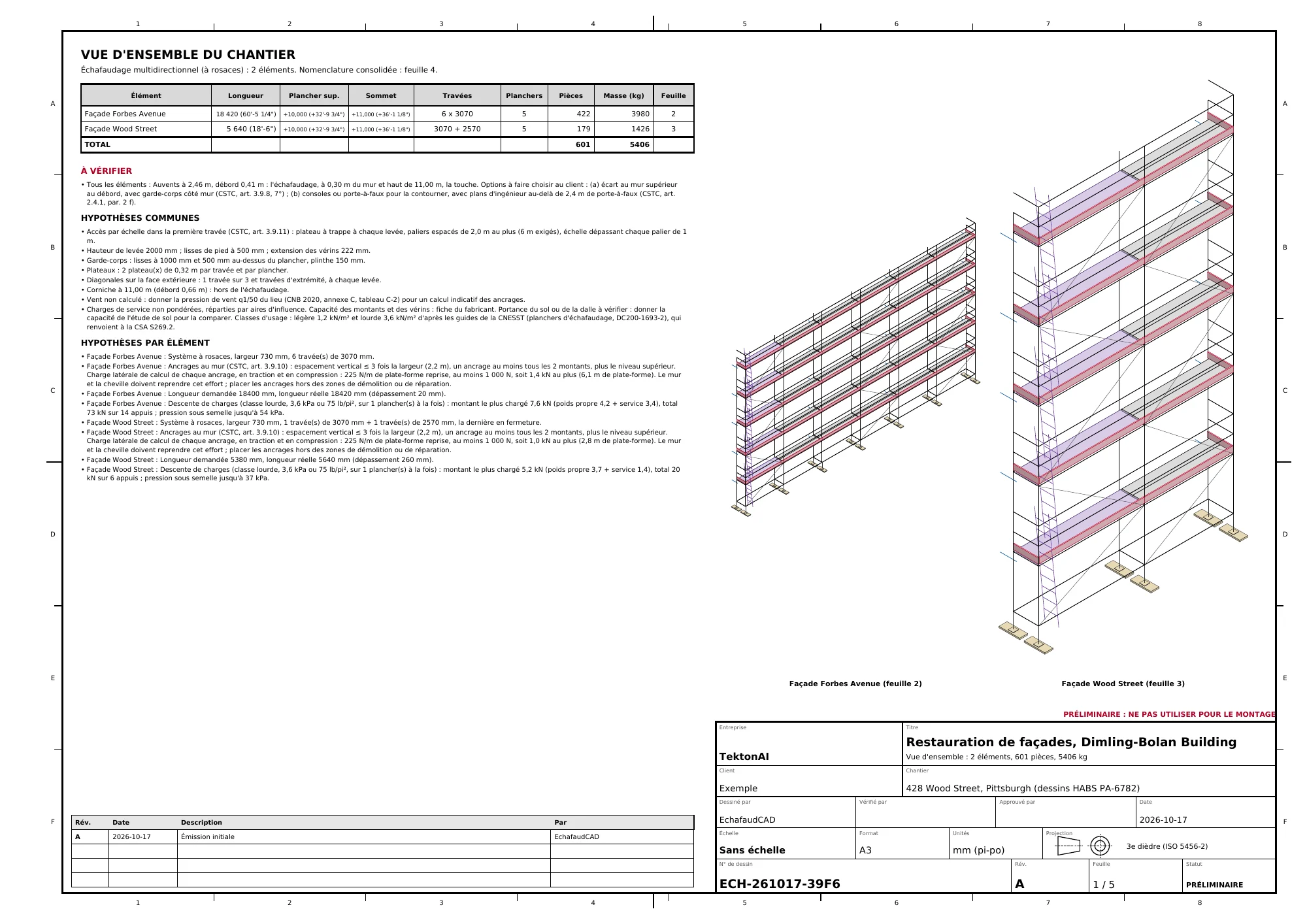
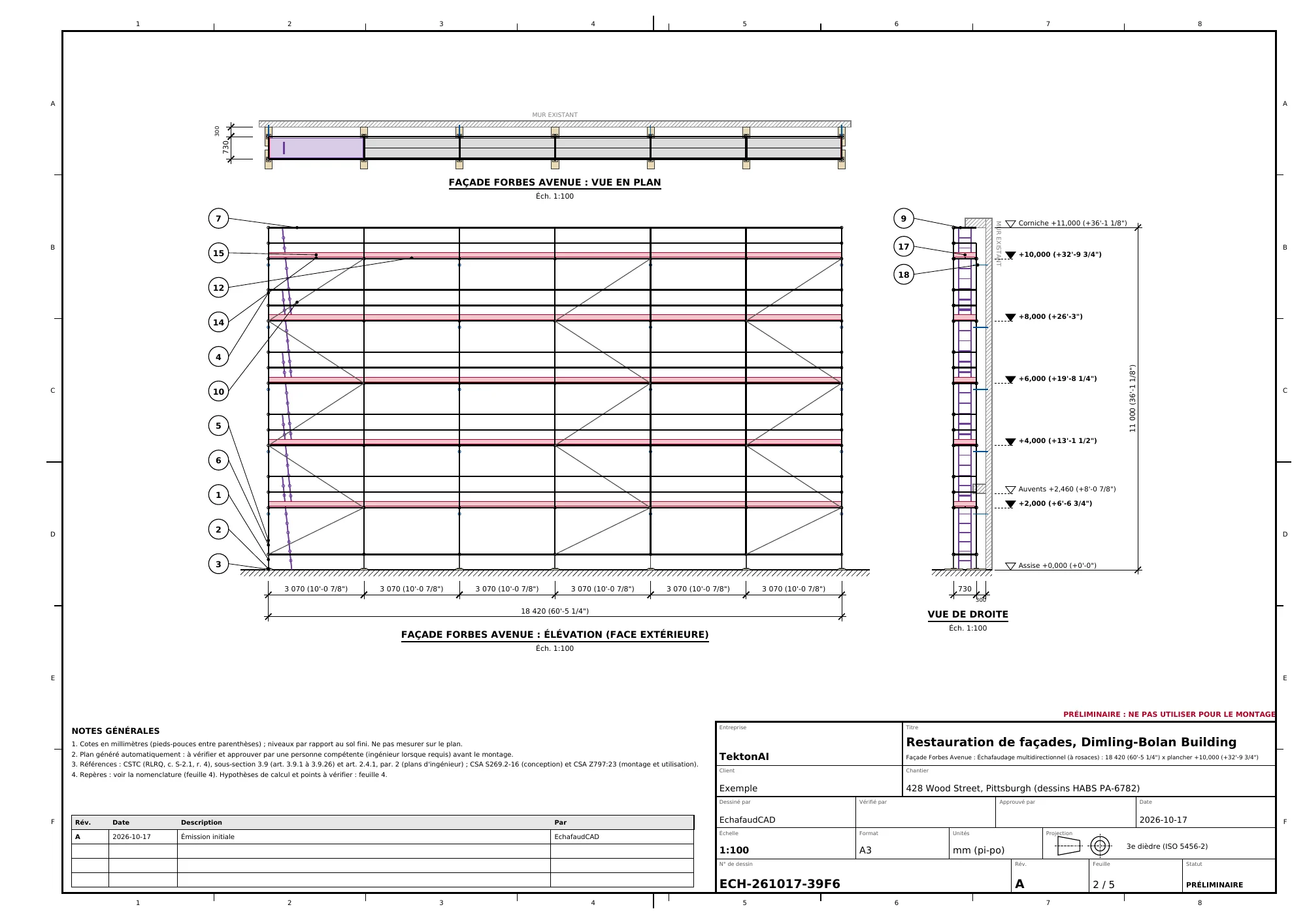
The projections are drawn on the right side view, at their height: the cornice at +11.000 and the awnings at +2.460.
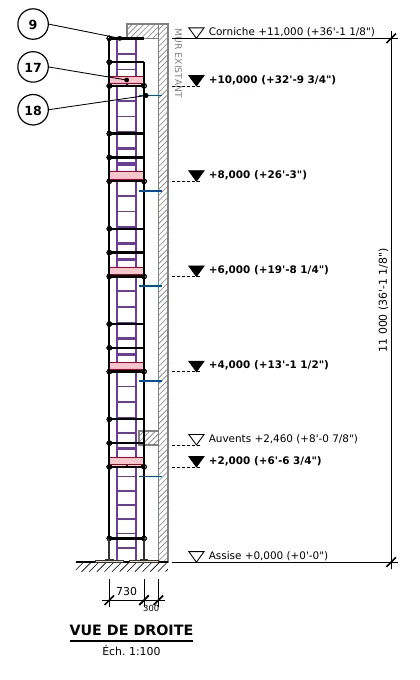
Scaffold checks each projection and states its conclusion:
- The cornice, at 11.0 m with a 0.66 m overhang, stays clear of the scaffold.
- The awnings, at 2.46 m with a 0.41 m overhang, hit the scaffold set 0.30 m from the wall. The plan offers two options. The client chooses:
- (a) a distance from the wall greater than the overhang, with a guardrail on the wall side, as required by article 3.9.8 of Québec’s Code de sécurité pour les travaux de construction (CSTC, Construction Safety Code);
- (b) brackets to get around the awnings, with engineering drawings for a cantilever over 2.4 m.
Here is what the plan did with our dimensions:
- Forbes Avenue: 6 bays of 3.07 m, or 18,420 mm. That is 20 mm more than the façade.
- Wood Street: one bay of 3.07 m and one of 2.57 m, or 5,640 mm. That is 260 mm more. The length is always rounded to whole bays.
- Five platforms, every 2 m, from +2.0 m to +10.0 m. The top of the scaffold is at +11.0 m.
- Access: 10 hatch decks with built-in ladders, 5 per façade. There is no stair tower, because the scaffold stays under 18 m.
- 30 ties, spaced according to article 3.9.10 of the CSTC. Place them outside the repair areas.
- The load takedown in the heavy class: 7.6 kN at the foot of the most heavily loaded standard on Forbes Avenue, and up to 54 kPa under the sole plates.
Step 5: check the plan against the drawings
Go back to the takeoff from step 2 and check four points:
- The top. The scaffold stops at +11.0 m, below the cornice. The underside of the cornice is worked from the top platform. The top of the cornice and the parapet, up to 13.03 m, need another solution, such as access from the roof. Choose it with your competent person.
- The awnings. Choose one of the plan’s options, or have the awnings removed during the work.
- The sidewalk. Its slope of about 0.15 m (6 in) is taken up by the base screw jacks. Check its width for pedestrians.
- The corner. The two façades are two separate elements. Their junction at the corner of Wood Street and Forbes Avenue is not drawn. Plan for it.
Once you have made your choice, revise the plan by its number. You don’t have to start over:
Revise plan ECH-261017-39F6: the awnings stay in place, we go with option (a) with a distance of 0.50 m from the wall. Change nothing else.
Replace 0.50 m with your own measurement.
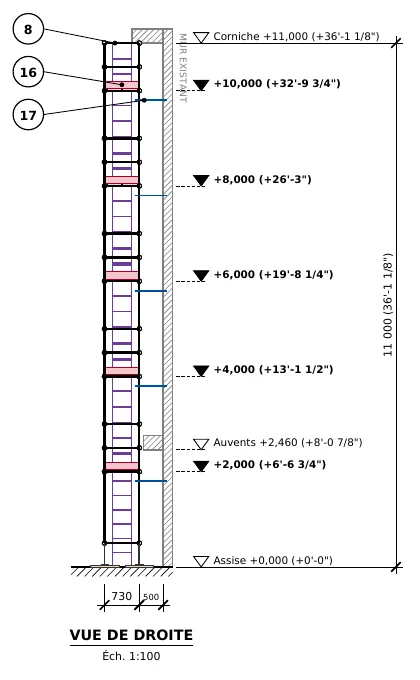
In our example, revision B places the scaffold 0.50 m from the wall:
- The awnings are then “clear of the scaffold”.
- Scaffold adds a wall-side guardrail automatically. Beyond 350 mm, the CSTC requires one (article 3.9.8).
- The plan goes to 721 pieces and 6,544 kg.
Good to know
Scaffold plans are preliminary. A competent person must check them before erection. An engineer must sign them when the province’s regulation requires it.
Drawing source
Dimling-Bolan Building, 428 Wood Street, Pittsburgh. Historic American Buildings Survey, National Park Service, HABS PA-6782; drawings by DeNinno Architects, LLC, 2012; Library of Congress. The Library of Congress lists no known restrictions for these drawings, and Wikimedia Commons classifies them as public domain. Viewed on Wikimedia Commons: elevations and floor plans.
.png)
.png)
Download the files of this example
The real files the tool produced for this example. They are preliminary and serve as an example. They predate the verification reference (Réf. TK) and do not carry one. These files are in French; the tool also produces them in English.
Dimling-Bolan Building, two street façades
The plan from step 4: drawing ECH-261017-39F6, 5 sheets, 601 pieces, 5,406 kg.
- PDFA3 PDF planECH-261017-39F6_revA_plan.pdf · 127 kB
- DXFCAD plan (DXF)ECH-261017-39F6_revA_plan.dxf · 1.7 MB
- STEP3D model (STEP)ECH-261017-39F6_modele.step · 4 MB
- XLSXBill of materials (Excel)ECH-261017-39F6_nomenclature.xlsx · 9 kB
- CSVBill of materials (CSV)ECH-261017-39F6_nomenclature.csv · 2 kB
- JSONPlan data (JSON)ECH-261017-39F6_donnees.json · 16 kB
Revision B: option (a), 0.50 m from the wall
The revision from step 5: wall-side guardrail added, 721 pieces, 6,544 kg.