 TektonAI
Make a scaffold plan with your own parts
A scaffold plan made with the parts of your fleet: your bays, your part numbers and your weights. The parts you lack are clearly flagged.
Before you start: create a TektonAI projectThe instructions to paste into Claude or ChatGPT, once and for all.
A project keeps instructions that apply to all its conversations. Create one for TektonAI: in every conversation, your assistant knows what our tools do and how you work, without you repeating it.
In Claude (tested)
- In Claude's left sidebar, open Projects, then Create project. Name it, for example “TektonAI”.
- In the project, open the project instructions and paste the text below. Replace the parts in brackets.
- Open a conversation in this project. In the conversation's tools menu, check that TektonAI is turned on.
On a Claude Team or Enterprise plan, share the project with your colleagues: they all start from the same instructions.
In ChatGPT (not tested)
- In ChatGPT's left sidebar, create a new project.
- In the project settings, paste the text below into its instructions.
TektonAI must first be added to ChatGPT: see Connect your AI assistant.
In Claude Code
Paste the text into the CLAUDE.md file of the folder you work in.
The instructions to paste
You work for [your company name], a construction company in [city, province], with the TektonAI tools connected to this conversation.

What the TektonAI tools do:
- Scaffold prepares 3D scaffold plans from the dimensions of the structure: dimensioned A3 PDF plan, CAD plan (DXF), 3D model (STEP), bill of materials in Excel and CSV, and the load takedown. It revises an existing plan from its drawing number.
- Inventory keeps track of everything our company owns: quantities available, rented out, in for repair and out of service, by location, and every movement with the employee's name. It imports our parts list and reads barcodes.
- Scaffold plans use the parts of our Inventory when we ask.
- Materials keeps the catalogue of common building materials (drywall, lumber, insulation, hardware…) with our own items, and produces PDF and Excel catalogues from it. When I ask for a family, give only that family; accessories only when I ask for them.

How to work with me:
- Answer in English, in plain words and site terms. Produce documents (plans, calculation notes, labels, slips) in English.
- Use the TektonAI tools for every plan, quantity or weight. Never make up a dimension, a quantity or a weight.
- Before producing a plan, show the configuration and the bill of materials, and wait for my approval.
- When a tool asks me a question through a form, let me answer it myself. Never choose the duty class (light, intermediate or heavy) for me.
- Leave plans at the “PRÉLIMINAIRE” (preliminary) status until I give you the names of the person who checked the plan and the person who approved it.
- For an import into Inventory, show the preview, let me choose the mode and wait for my confirmation: a click on the card, or the word “Import” that I type myself. Pass my message on exactly as I wrote it.
- Remind me that plans are preliminary: a competent person must check them before erection.
The same text is also at tektonai.app/en/project-instructions.md.
By default, Scaffold draws with a catalogue of generic parts. If your parts are in your Inventory, it can draw with your fleet:
- your bay lengths;
- your part numbers;
- your weights.
This tutorial shows how to ask for it and how to read the result.
What you need
- Your parts in Inventory. If that is not done yet, follow Import your inventory from Excel.
- The façade dimensions: its length and the height of the top platform.
Step 1: see which parts Scaffold recognizes
Which parts of our inventory can you use for our plans?
Scaffold matches each of your parts to a generic part:
- of the same family;
- with the same dimensions, within 5 mm.
Every dimension on your record must match. Otherwise the part has no equivalent, and Scaffold tells you so. A match found this way is marked “deduced from the record’s dimensions”.
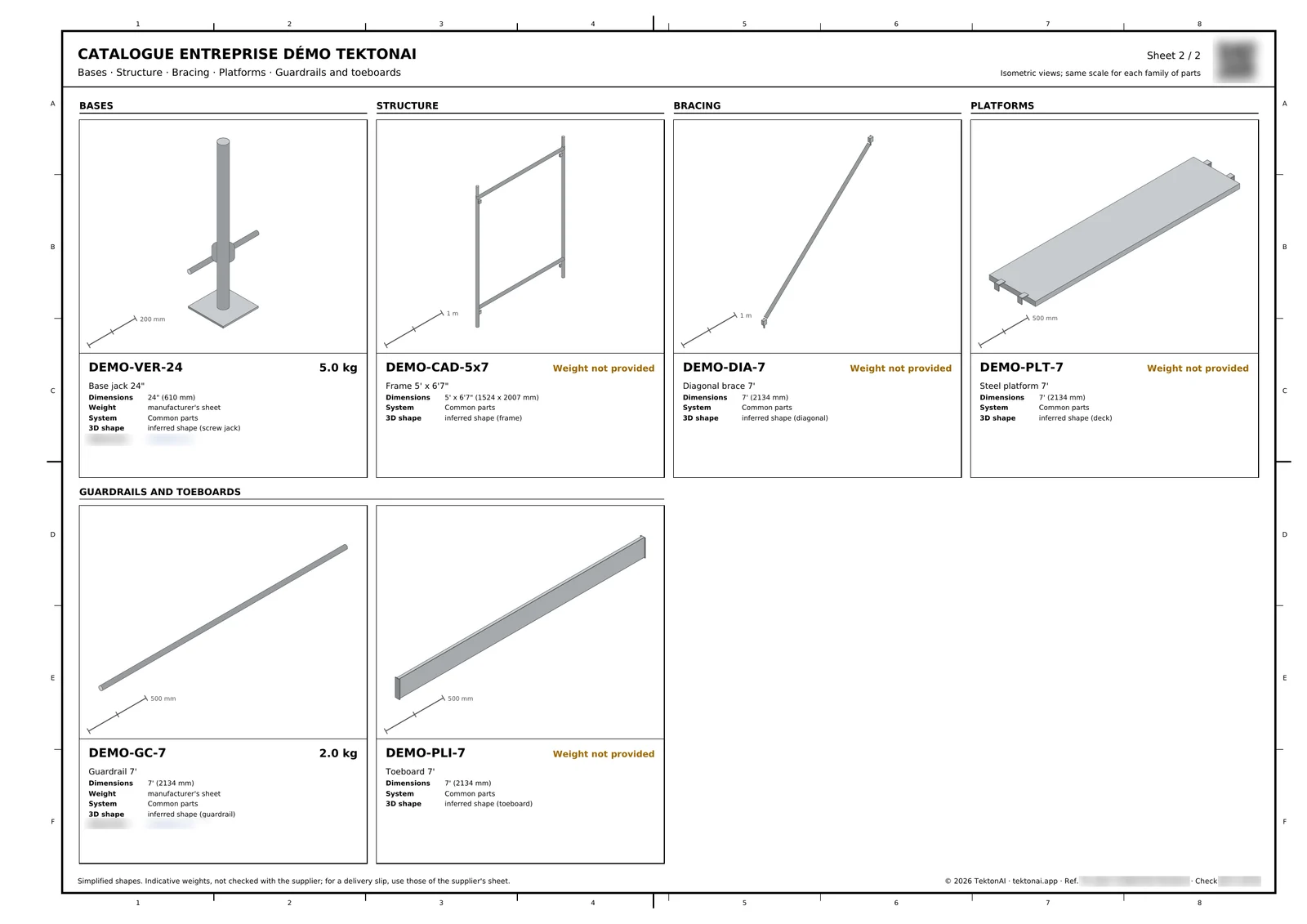
To see your parts as pictures:
Produce our parts catalogue.
You get:
- a PDF with a view of each part, its part number, dimensions and weight;
- a 3D model;
- an Excel file.
Step 2: ask for the plan with your parts
Prepare a scaffold plan for a 12.8 m (42 ft) façade, top platform at 8 m (26 ft), frame scaffold, light duty class, with the parts of our inventory.
The bay length comes from your fleet. For example, if your ledgers are 7 ft long, the plan is laid out in 7 ft bays. The plan’s assumptions say so, for example with the line “Equivalences deduced from the dimensions of the records” followed by your company’s name.
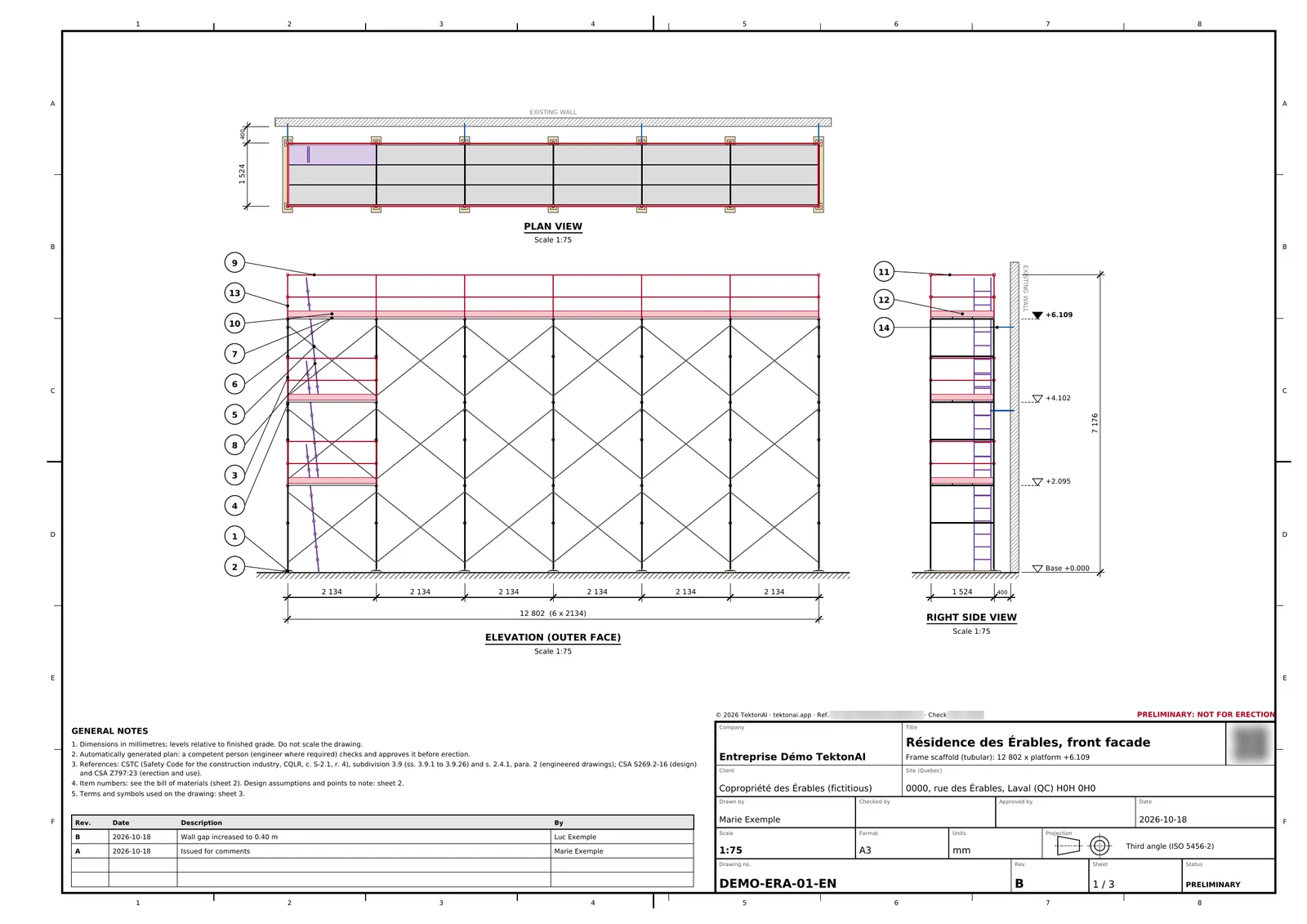
Here is the plan made with the fictional company’s parts. You can see its 5 ft × 6 ft 7 in frames and its 7 ft bays.
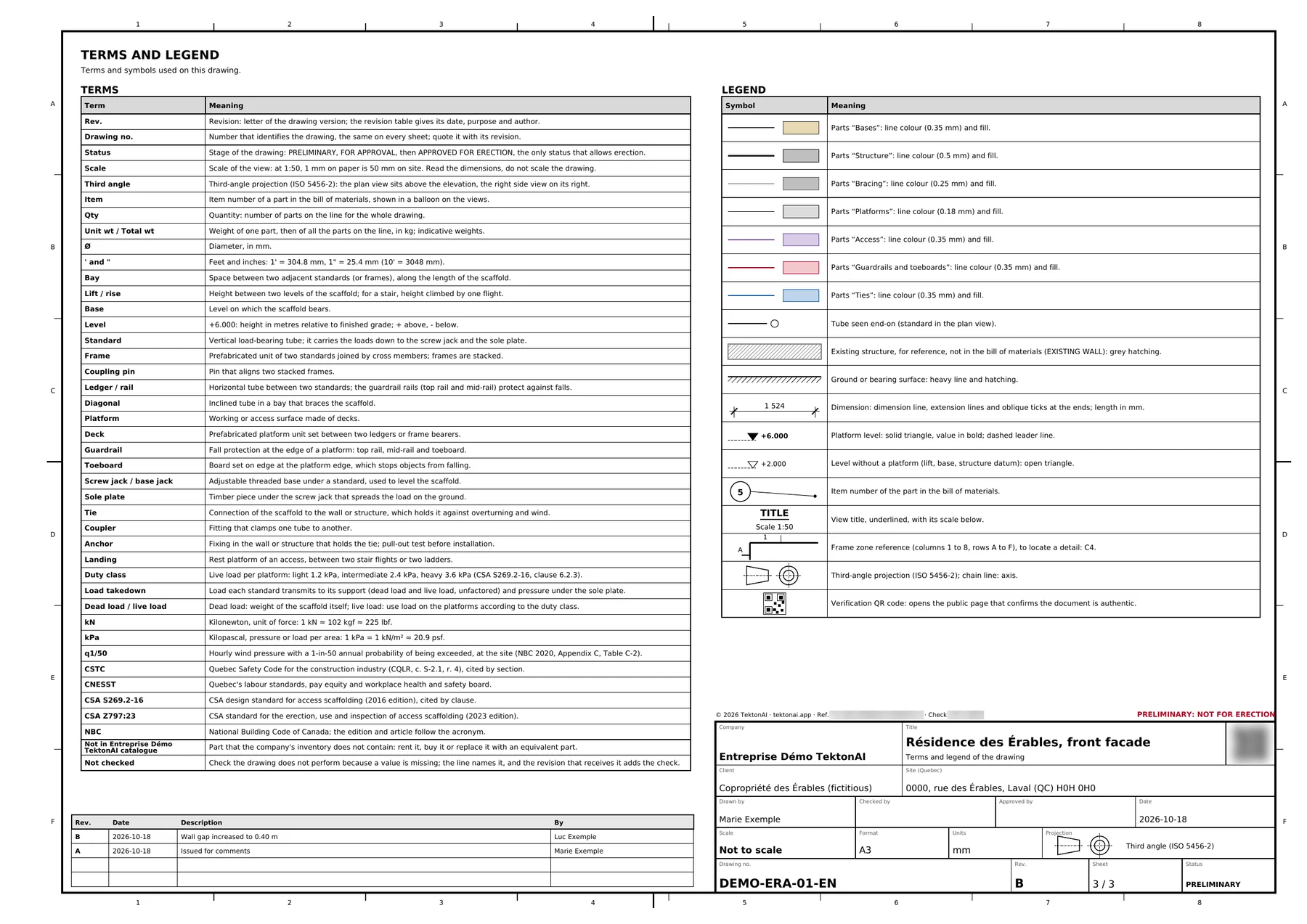
The plan’s last sheet is called “Terms and legend”. It explains the terms and symbols of the plan, including the part categories. It is useful when you hand the plan to a crew that does not know your part numbers.
Step 3: answer the questions, if any
Scaffold asks a question only when a missing value would make the plan wrong or dangerous. For example:
- the platform height, when nothing sets it;
- the tie spacing, when the province gives no figure;
- the site terrain and the risk category for wind, only when the façade is covered with sheeting or netting;
- the netting’s solidity ratio, found on its data sheet;
- the soil bearing capacity, when the pressure under a base plate exceeds 75 kPa (CSA S269.2-16, clause 7.7.8.6 (a)).
These questions come in a form:
- Answer the questions.
- Send the form.
Scaffold then produces the plan with your answers. For an ordinary plan, expect 1 to 3 questions.
Step 4: read the bill of materials
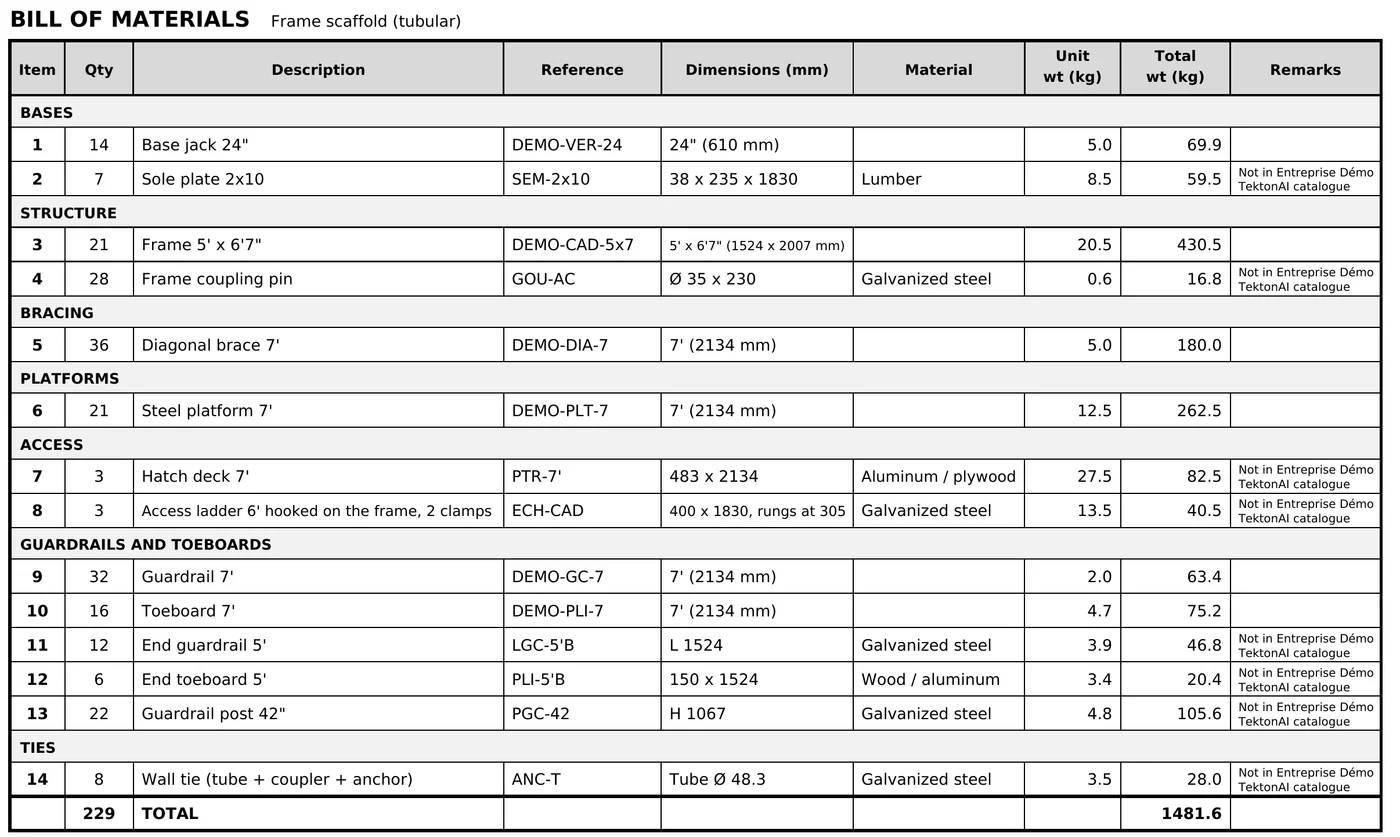
The bill of materials carries your part numbers and weights.
When a part the plan needs is missing from your fleet, the plan uses the generic part. The Remarks column says so: “Not in
Step 5: read what the plan does not check
Some missing information does not block the plan. The plan comes out anyway. The plan and the calculation note then carry one line for each check that was not done, for example:
- the capacity of the standards, when the manufacturer’s data sheet is not provided;
- the soil bearing capacity, when the soil report is not provided.
You get the form for these questions with the plan. When you have the information, answer the form. The next revision does the check, and the line goes away. See Revise a plan and track its versions.
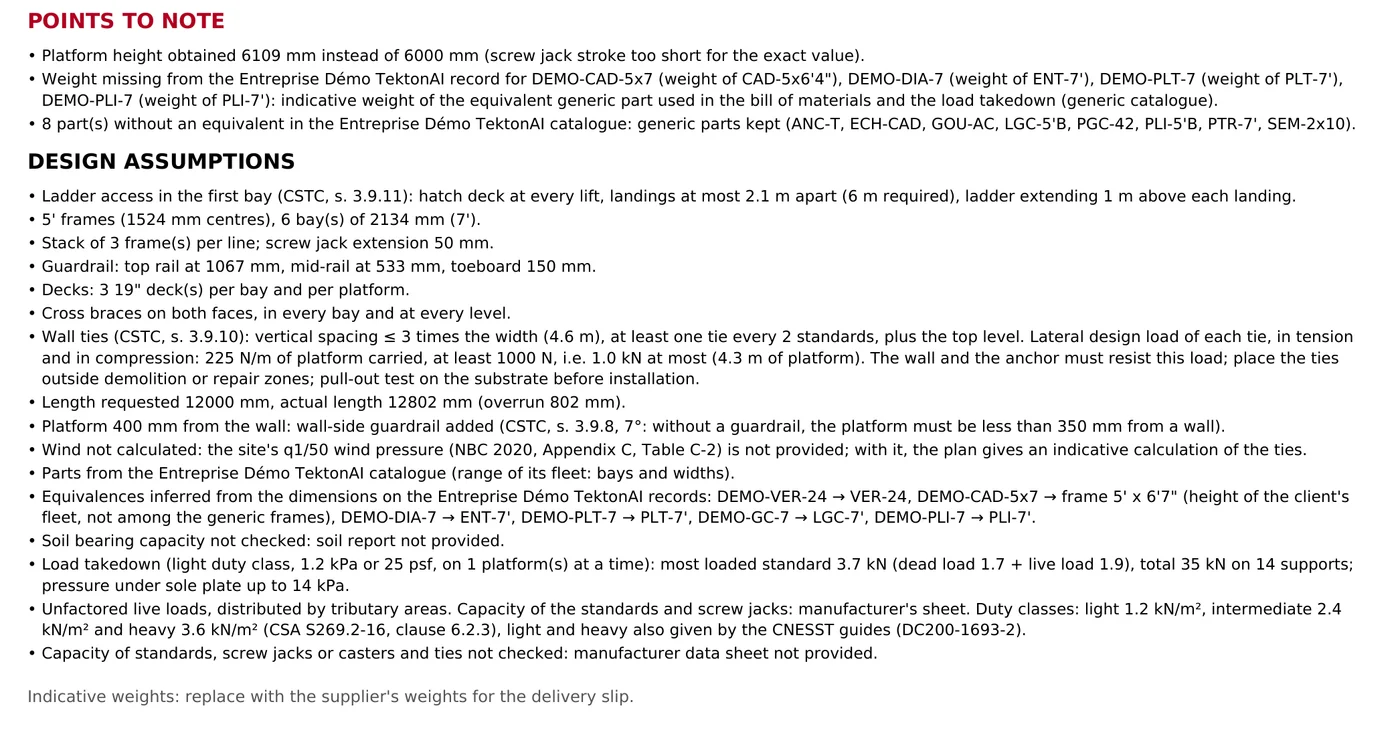
At the top of these assumptions, the “Points to note” flag what the plan had to adapt:
- a height different from the one requested;
- a weight taken from the generic part, because your record does not give it;
- the parts with no equivalent in your fleet.
Good to know
- The plan stays preliminary. A competent person must check it before erection.
- Scaffold draws only scaffold parts. Your fencing and other parts stay in Inventory.
- Scaffold gives no prices.
- Wind and tie forces are given for information only.
- Each tie needs a pull-out test on its support before installation.