 TektonAI
Fencing around a scaffold: clearance, gate and public walkway
From a Scaffold plan, Fencing draws the site fence: the clearance, the workers' gate, the public walkway and the ballast needed against the wind.
Your situation is different? How to create an accurate 3D scaffold plan with TektonAI · Revise a plan and track its versions
What you will get
The plan of the hoarding around your scaffold: the plan view, the bill of materials and the ballast needed against the wind.
Before you start: create a TektonAI projectThe instructions to paste into Claude or ChatGPT, once and for all.
A project keeps instructions that apply to all its conversations. Create one for TektonAI: in every conversation, your assistant knows what our tools do and how you work, without you repeating it.
In Claude (tested)
- In Claude's left sidebar, open Projects, then Create project. Name it, for example “TektonAI”.
- In the project, open the project instructions and paste the text below. Replace the parts in brackets.
- Open a conversation in this project. In the conversation's tools menu, check that TektonAI is turned on.
On a Claude Team or Enterprise plan, share the project with your colleagues: they all start from the same instructions.
In ChatGPT (not tested)
- In ChatGPT's left sidebar, create a new project.
- In the project settings, paste the text below into its instructions.
TektonAI must first be added to ChatGPT: see Connect your AI assistant.
In Claude Code
Paste the text into the CLAUDE.md file of the folder you work in.
The instructions to paste
You work for [your company name], a construction company in [city, province], with the TektonAI tools connected to this conversation.

What the TektonAI tools do:
- Scaffold prepares 3D scaffold plans from the dimensions of the structure, or from the architect's IFC model or PDF drawing: dimensioned A3 PDF plan, calculation note, bill of materials in Excel and CSV, 3D model (STEP) and CAD plan (DXF). It revises an existing plan from its drawing number.
- Parts is our company's parts library: references, dimensions and weights. It imports our parts list.
- Scaffold plans use the parts of our Parts library when we ask.
- Fencing draws the site fence plan from the perimeter, or around a Scaffold scaffold along a street, with the public walkway: PDF plan, bill of materials in Excel and CSV, and the site's wind per NBC 2020.
- Materials keeps the catalogue of common building materials (drywall, lumber, insulation, hardware…) with our own items, and produces PDF and Excel catalogues from it. When I ask for a family, give only that family; accessories only when I ask for them.

How to work with me:
- Answer in English, in plain words and site terms. Produce documents (plans, calculation notes, catalogues) in English.
- Use the TektonAI tools for every plan, quantity or weight. Never make up a dimension, a quantity or a weight.
- Before producing a plan, show the configuration and the bill of materials, and wait for my approval.
- When a tool asks me a question through a form, let me answer it myself. Never choose the duty class (light, intermediate or heavy) for me.
- Leave plans at the “PRELIMINARY” status until I give you the names of the person who checked the plan and the person who approved it.
- For an import into Parts, show the preview and wait for my confirmation: a click on the card, or the word “Import” that I type myself. Pass my message on exactly as I wrote it.
- Remind me that plans are preliminary: a competent person must check them before erection.
The same text is also at tektonai.app/en/project-instructions.md.
A scaffold along a street needs a hoarding: it closes the site and leaves a protected path for pedestrians. This tutorial shows how to get one with Fencing · Palissade, TektonAI’s tool for site fences, starting from a Scaffold plan.
Julie Exemple, of Entreprise Démo TektonAI, already has scaffold plan ECH-261022-A2E0, revision B: a scaffold 15.24 m (50’-0”) along the façade, 1.52 m (5’-0”) wide, 0.30 m (1’-0”) from the wall. She wants the hoarding around it, with a gate for the workers and a public walkway on the street side.
What you need
- The Scaffold plan number (ECH-…). Fencing reads the length of the scaffold, the width of the frames and the distance from the wall.
- The clearance you want around the scaffold.
- The width of the workers’ gate and of the public walkway, if you want them.
- Your fences in your Parts · Remise library, if you have any: panels, bases, stays and gates. Without them, Fencing uses generic parts.
Step 1: ask for the hoarding
Open a conversation in your TektonAI project. Give the scaffold plan number, the clearance, the panel type and the city of the site.
Prepare the hoarding around the scaffold of plan ECH-261022-A2E0: 1.5 m clearance, mesh panels, using the fences in our library. The site is in Montréal.
Always give the clearance: Fencing needs it to place the fence around the scaffold.
It worked when: Fencing answers with a form of questions.
Step 2: answer the questions
Before drawing, Fencing asks 7 questions. It draws nothing until they are answered:
- Is a pedestrian gate for workers needed in the hoarding, on the street side? Its width? (in mm)
- Is a public walkway needed between the hoarding and the street? Its width? (in mm)
- Is the site at the top or on the slope of a hill, ridge or escarpment?
- Importance category of the fence for wind (factor Iw, NBC 2020, Table 4.1.7.3)?
- The company’s library has panels of several heights: which fence height?
- The company’s library has several parts for the role “base”: which one should be used?
- The company’s library has several parts for the role “stay”: which one should be used?
The last three questions come from Julie’s library: it has two panel heights, two bases and two stays. With a single part per role, Fencing does not ask them.
Julie answers in the form:
- the site is not on a hill, ridge or escarpment;
- the importance category is normal;
- a 1829 mm (6 ft) fence;
- base DEMO-CLO-BASE and stay DEMO-CLO-CTF.
For the gate and the public walkway, she writes the widths in the conversation:
A 1.2 m workers' gate and a 1.5 m public walkway on the street side.
Tip: For now, give the gate and public walkway widths in the conversation, not in the form. Fencing reads them in your message.
It worked when: Fencing answers with a plan whose number starts with CLO-.
Step 3: read the plan
Fencing answers with the plan summary:
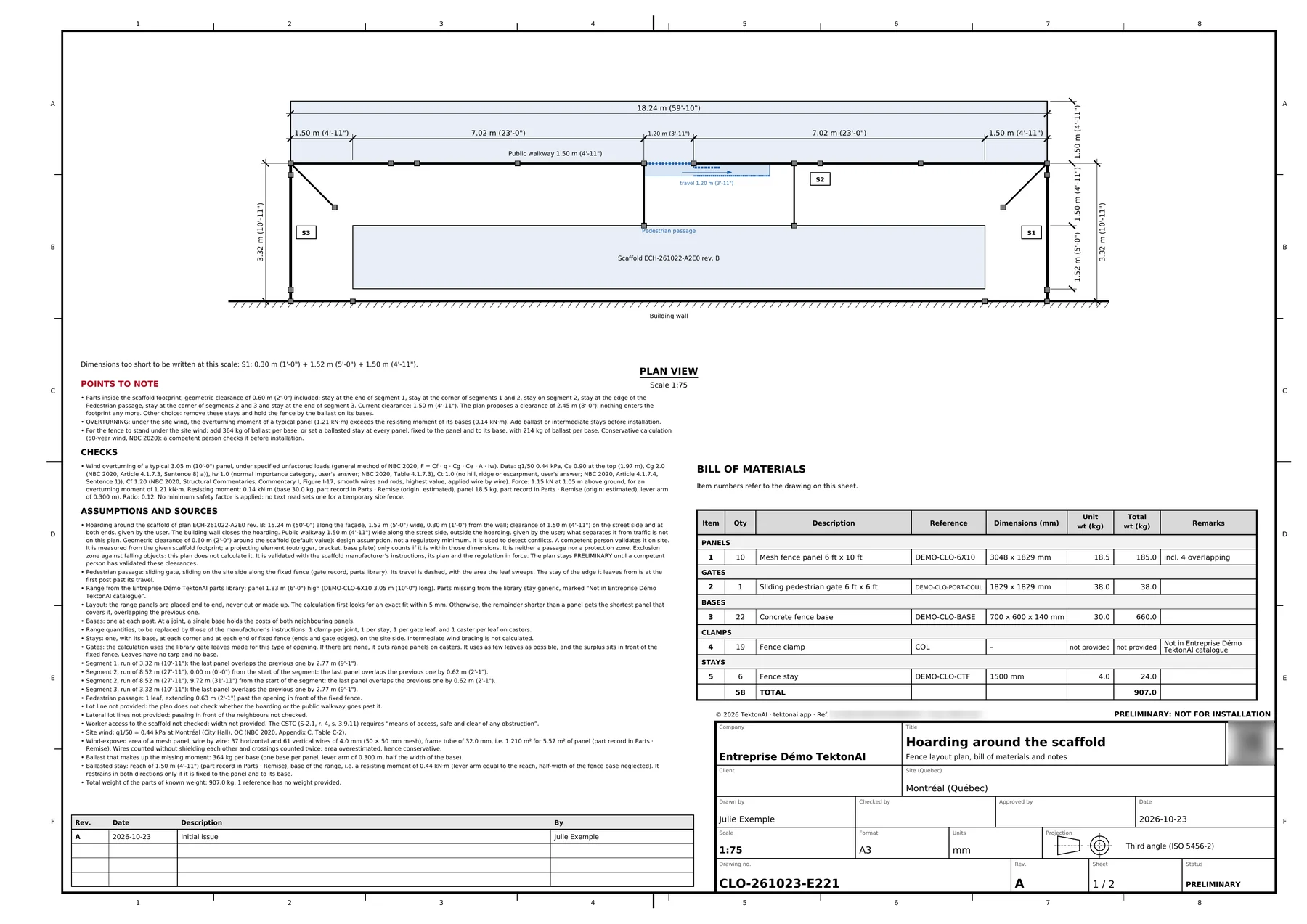
Plan CLO-261023-E221, revision A (PRELIMINARY)
Fence 1.83 m (6’-0”) high in mesh panels, open fence line, in 3 segments: perimeter of 24.89 m (81’-8”), 23.69 m (77’-9”) fenced in 4 runs. 10 panels, 22 bases, 1 gate. Parts from the Entreprise Démo TektonAI parts library, the others generic. Site wind: q1/50 = 0.44 kPa (Montréal (City Hall), QC).
The fence line is “open” because the building wall closes the hoarding. The plan draws:
- the wall and the scaffold;
- the hoarding on three sides, up to the wall;
- the sliding gate, with its travel;
- the public walkway on the street side.
You get four files, with links valid for 30 days:
- the PDF plan;
- the bill of materials in Excel;
- the bill of materials in CSV;
- the “Part codes” annex, as a PDF, since the plan uses the parts in your library.
The bill of materials counts every part: 10 mesh panels of 6 ft x 10 ft, 4 of them overlapping, 1 sliding pedestrian gate, 22 bases, 19 fence clamps and 6 stays. No panel is cut: when a run does not come out even, the last panel overlaps the one before. The clamps are not in Julie’s library: the bill of materials marks them “Not in Entreprise Démo TektonAI catalogue”.
It worked when: You have the PDF plan and the bill of materials, with your part numbers.
Step 4: read the points to note
Under the summary, Fencing lists what needs your attention. Here, stays enter the scaffold footprint:
Parts inside the scaffold footprint, geometric clearance of 0.60 m (2’-0”) included: stay at the end of segment 1, stay at the corner of segments 1 and 2, stay on segment 2, stay at the edge of the Pedestrian passage, stay at the corner of segments 2 and 3 and stay at the end of segment 3. Current clearance: 1.50 m (4’-11”). The plan proposes a clearance of 2.45 m (8’-0”): nothing enters the footprint any more. Other choice: remove these stays and hold the fence by the ballast on its bases.
Julie answered the wind questions, so the plan checks the panels for overturning. The bases alone are not enough, and the plan says what to add:
- OVERTURNING: under the site wind, the overturning moment of a typical panel (1.21 kN·m) exceeds the resisting moment of its bases (0.14 kN·m). Add ballast or intermediate stays before installation.
- For the fence to stand under the site wind: add 364 kg of ballast per base, or set a ballasted stay at every panel, fixed to the panel and to its base, with 214 kg of ballast per base. Conservative calculation (50-year wind, NBC 2020): a competent person checks it before installation.
Watch out: Do not install the fence without the ballast shown. A competent person checks the calculation before installation.
The plan also says what it does not check, for lack of information:
- Lot line not provided: the plan does not check whether the hoarding or the public walkway goes past it.
- Lateral lot lines not provided: passing in front of the neighbours not checked.
- Worker access to the scaffold not checked: width not provided. The CSTC (S-2.1, r. 4, s. 3.9.11) requires “means of access, safe and clear of any obstruction”.
At the end of its answer, Fencing asks the questions that allow these checks:
- the distance from the wall to the lot line, on the street side;
- the distance to the lot lines, left and right of the scaffold;
- the clear width to keep for worker access;
- what to do with the stays inside the footprint: raise the clearance to 2.45 m (8’-0”), or remove these stays and hold the fence by ballast only.
Answer them when you have the information: the next revision makes the check.
It worked when: You know what ballast to plan and which checks remain.
Step 5: widen the clearance
Julie widens the clearance. She does not have to describe everything again: Fencing revises the plan.
Increase the clearance to 2 m.
Fencing produces revision B of the same plan:
Plan CLO-261023-E221, revision B (PRELIMINARY)
Fence 1.83 m (6’-0”) high in mesh panels, open fence line, in 3 segments: perimeter of 26.89 m (88’-3”), 25.69 m (84’-3”) fenced in 4 runs. 10 panels, 22 bases, 1 gate.
The revision table adds the line “B · 2026-10-23 · Increase the clearance to 2 m · Julie Exemple”.
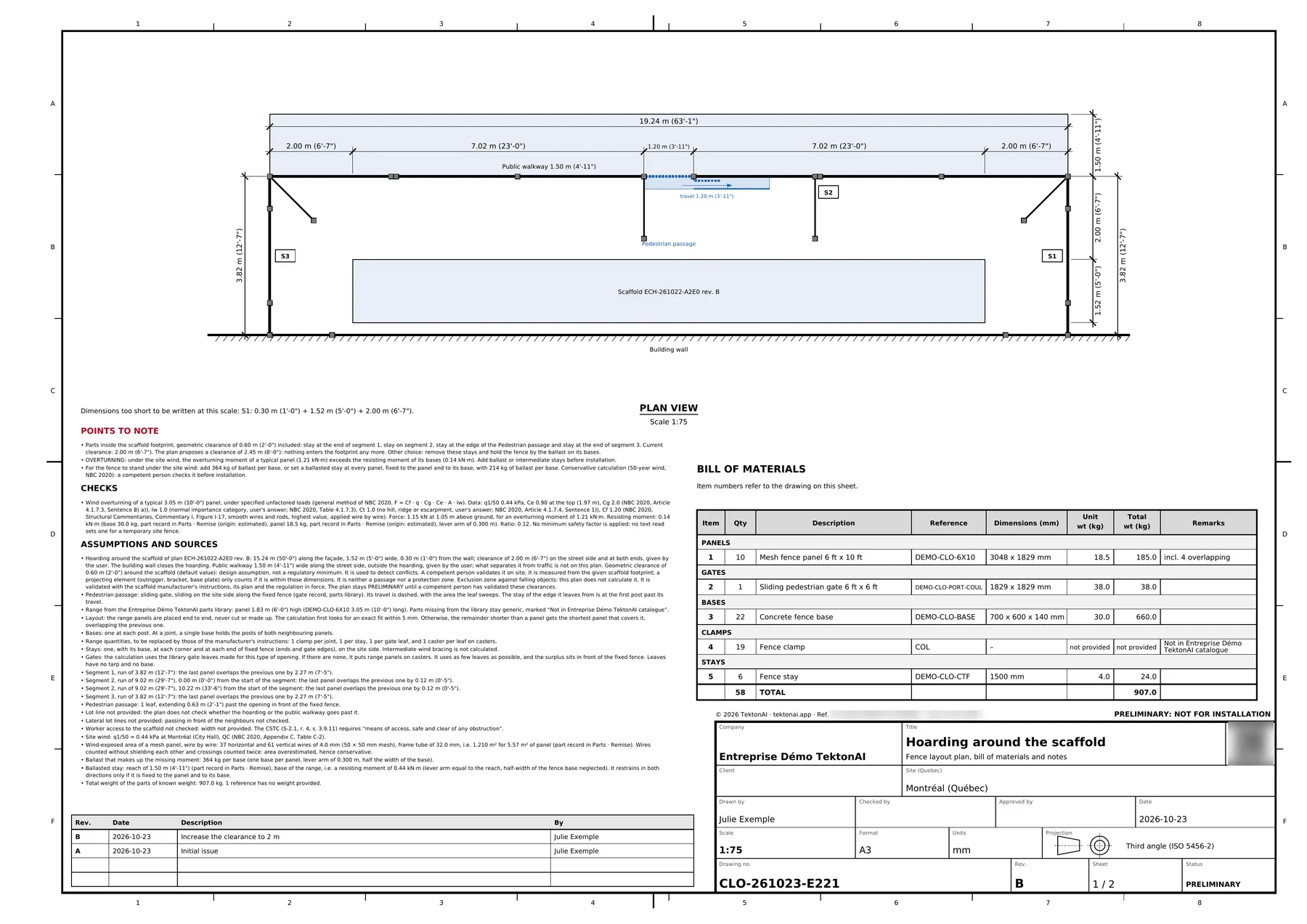
At 2.00 m (6’-7”), four stays still touch the scaffold footprint. The plan repeats the two choices: a clearance of 2.45 m (8’-0”), or remove these stays and hold the fence by the ballast on its bases. Give your choice to your assistant, and Fencing makes the next revision. See Revise a plan and track its versions.
It worked when: The plan shows revision B and the revision line with your description.
Step 6: verify the plan
Each PDF carries a reference and a QR code. The QR code opens TektonAI’s verification page. It says whether the plan is authentic, who issued it and when. See Verify a plan.
It worked when: The verification page shows the plan's reference as authentic.
Special cases
- You have no fences in your library: Fencing uses generic parts and does not ask about the height, the base and the stay.
- Stays enter the scaffold footprint: choose a wider clearance, or remove these stays and hold the fence by the ballast on its bases.
- The site is on a hill, ridge or escarpment: say so in the form. The wind calculation takes it into account.
- You work in French: write your request in French, or set the language of your profile. The plan then comes out in French.
- Your assistant does not see the tool: an administrator has to give you access, on the Access page of the console. See Your team in TektonAI.
Good to know
- The plan stays preliminary. It says so itself: “This plan is not approved for installation: it is for preparing the fence and having it checked.”
- The 0.60 m (2’-0”) geometric clearance around the scaffold is a design assumption, not a regulatory minimum. A competent person validates it on site.
- Fencing gives no prices.
Download the files of this example
The real files the tool produced for this example. They are preliminary and serve as an example.
Plan CLO-261023-E221, revision A
The plan from step 3: 1.50 m clearance, 10 panels, 22 bases, 1 gate. The QR code on each PDF opens its verification page.
Plan CLO-261023-E221, revision B
The plan from step 5: clearance raised to 2.00 m.